 Aizaz
Aizaz

NetSuite Work Order API: Automating Excel-to-NetSuite Work Orders Reliably
Creating a Work Order through the NetSuite REST API is not usually the difficult part.
The difficult part starts when the Work Order is coming from somewhere else.
Maybe operations sends an Excel file every morning. Maybe a manufacturing system exports orders in batches. Maybe another application decides what needs to be built and NetSuite is supposed to receive the final transaction.
At that point, the problem is no longer:
How do we POST a Work Order to NetSuite?
It becomes:
How do we make sure the right Work Order gets created once, with the right data, and that someone knows what happened when something goes wrong?
That distinction matters.
A script that successfully creates one Work Order in a sandbox is useful.
A process that can reliably handle hundreds or thousands of Work Orders without creating bad ERP data is an integration.
Can NetSuite Work Orders Be Created Through the REST API?
Yes.
NetSuite exposes the Work Order record through REST Web Services using the record ID:
workOrder
A Work Order can be created through a POST request against:
/services/rest/record/v1/workOrder
Oracle's documentation also notes that the Work Orders feature must be enabled before the record can be used through REST Web Services. Oracle Docs
A simplified payload might contain values such as:
{
  "assemblyItem": {
    "id": "66"
  },
  "subsidiary": {
    "id": "5"
  },
  "location": {
    "id": "12"
  },
  "quantity": 50
}
That's the straightforward part.
The architecture around that request is what determines whether the integration remains reliable once real operational data starts moving through it.
What an Excel-to-NetSuite Work Order Flow Actually Needs
At a high level, the workflow may look simple:
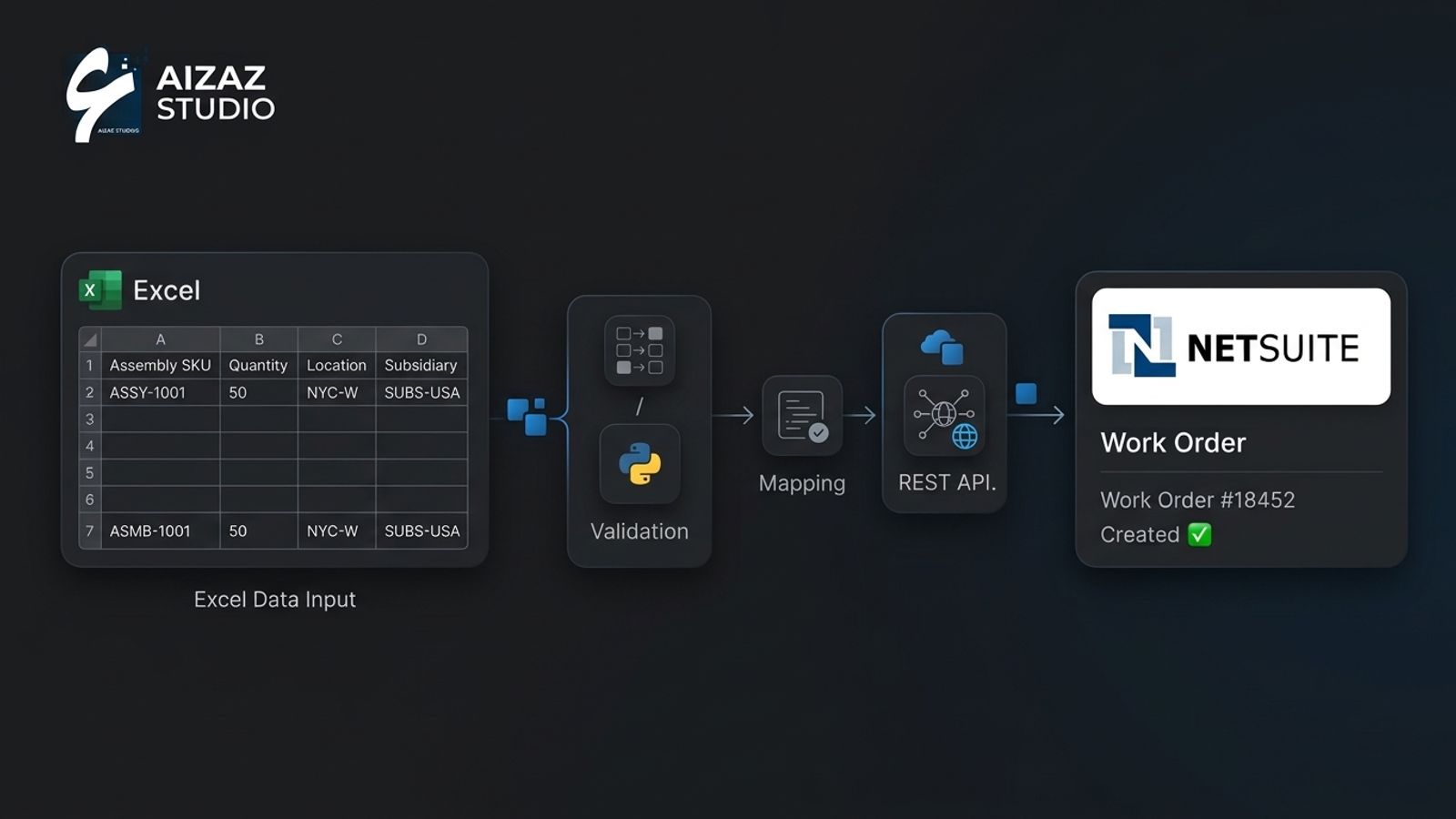
Excel → validation → mapping → NetSuite REST API → Work Order
But each step answers a different business question.
Excel input: What did the source system or operations team actually ask us to create?
Validation: Is the request complete and safe to process?
Mapping: Which NetSuite records do those external values correspond to?
API request: Can NetSuite create the intended transaction?
Result tracking: What happened, and can we prove it later?
That is why we don't usually treat the REST request itself as the entire integration.
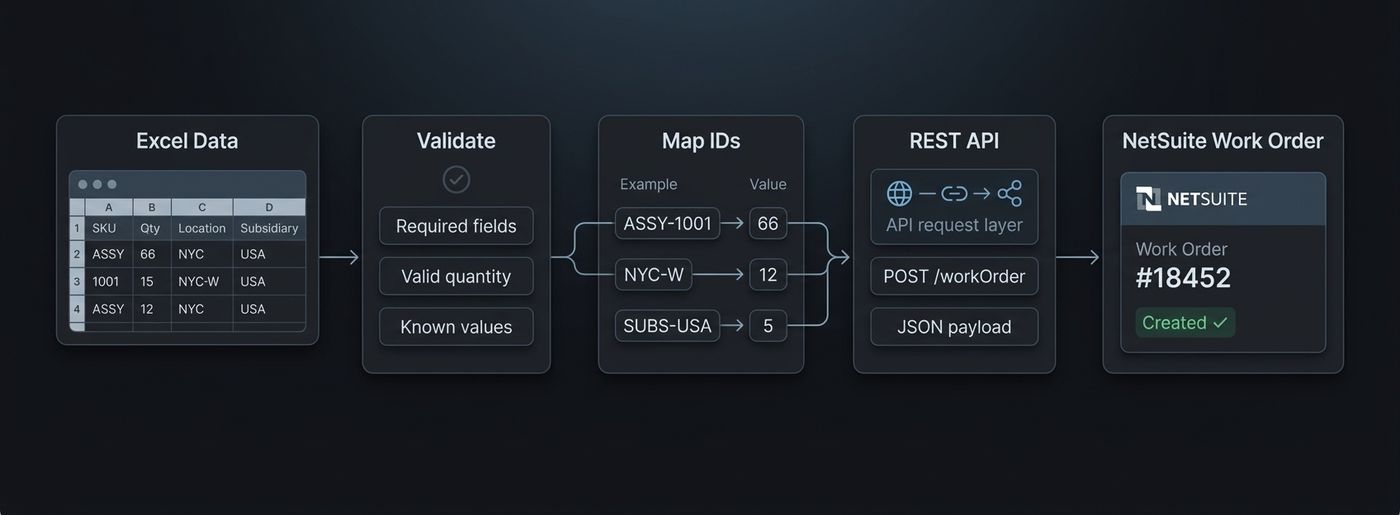
What happens if an assembly SKU was renamed?
What happens if the same SKU exists under a different process or subsidiary?
What happens when a location has been disabled in NetSuite but is still present in an old spreadsheet template?
A fragile integration guesses.
A reliable integration stops that row, records why it could not be processed and gives someone enough information to correct it.
Creating no Work Order is usually preferable to silently creating the wrong Work Order.
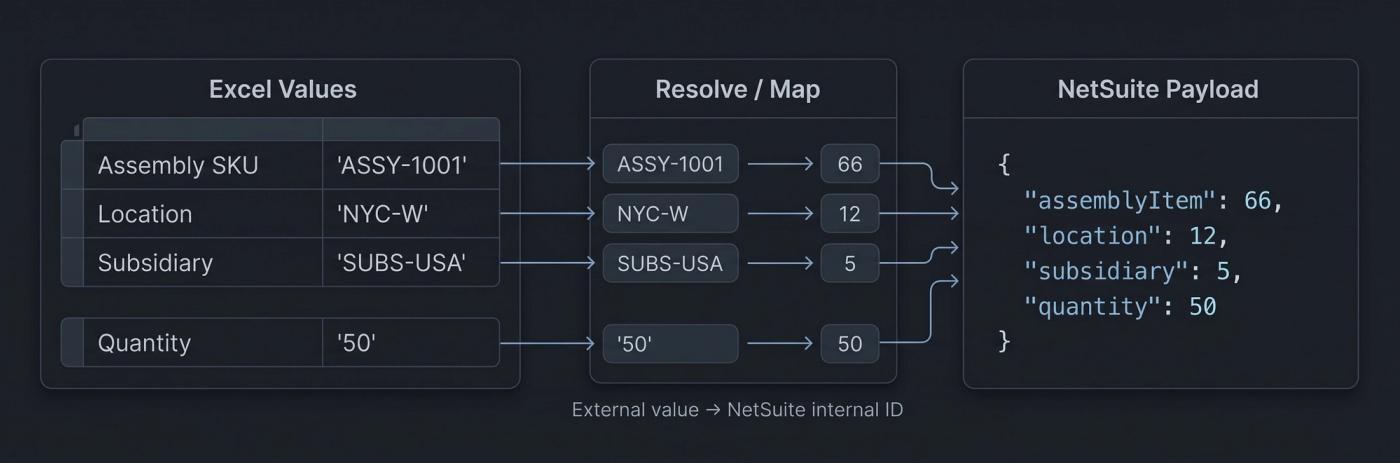
This is also why we generally separate source data from NetSuite record mapping.
If those concerns are separated properly, the source can change later without forcing you to rewrite all of the NetSuite logic.
Today:
Excel
Tomorrow:
SFTP
or:
Manufacturing System
or:
Custom Application
The mapping and NetSuite processing layer can remain largely independent.
Validation Should Happen Before the API Call
A production integration should try to catch predictable errors before sending anything to NetSuite.
For a Work Order import, that might include checking:
- required columns are present
- assembly item can be resolved
- quantity is valid
- location can be resolved
- subsidiary can be resolved
- required custom fields are present
- the source transaction has not already been processed
The exact checks depend on the NetSuite account.
That last point is important.
There isn't one universal Work Order payload that every account can copy.
Custom fields, manufacturing configuration, subsidiaries, forms and business rules can all change what the integration needs to provide.
This is one reason we prefer understanding the actual NetSuite environment before designing the import around a spreadsheet template.
Creating the Work Order Is Only One Step
Once a row has been validated and mapped, the integration can construct the Work Order payload and send it to NetSuite.
Conceptually, the Python side may be as small as:
payload = build_work_order_payload(source_row)response = requests.post( f"{netsuite_url}/workOrder", headers=headers, json=payload, timeout=30)response.raise_for_status()
That is enough to demonstrate the API call.
It tells us almost nothing about whether the overall process is safe to run unattended.
The difficult questions start immediately afterward:
- Did NetSuite create the record?
- What internal ID was returned?
- What happens if the connection times out?
- Can the request safely be retried?
- How does an operator know which Excel row failed?
- How do we reconcile the import against NetSuite tomorrow?
Those are integration questions, not HTTP questions.
A Timeout Can Be More Dangerous Than a Clean Failure
This is one of the easiest problems to overlook.
Imagine the following sequence:
- The integration sends a Work Order to NetSuite.
- NetSuite successfully creates it.
- The network connection drops before the response gets back.
- The integration sees a timeout.
- The integration assumes the request failed.
- It automatically sends the same request again.
Now you may have two Work Orders.
The first request did not actually fail.
Only the response failed to reach the calling system.
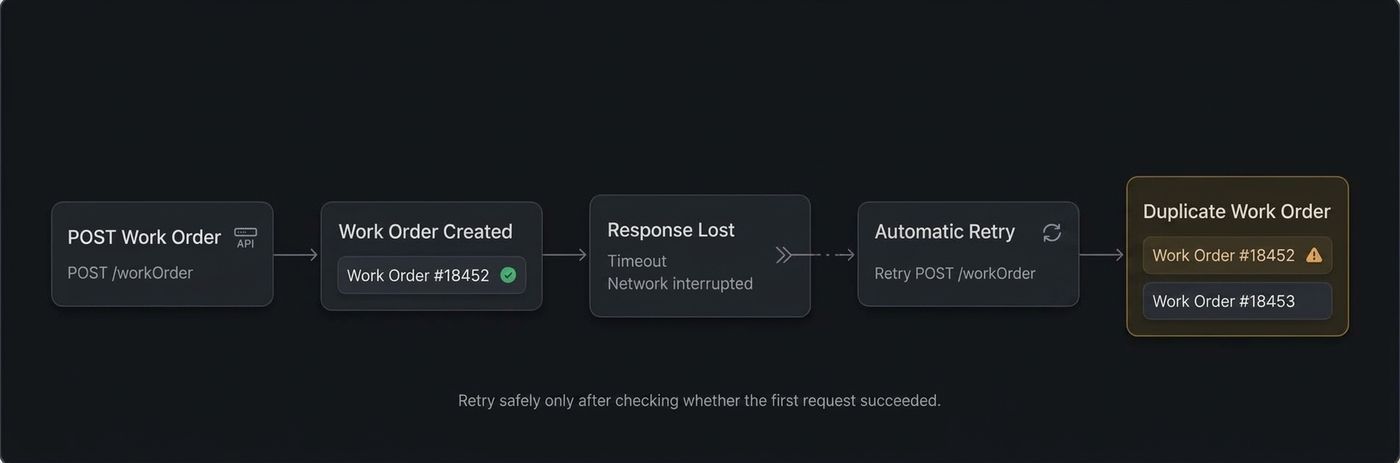
This is why retry logic cannot simply mean:
If request fails, try again.
A production integration needs some method of determining whether the business transaction has already been processed.
One approach is to carry a stable source identifier such as:
IMPORT-WO-2026-00982
and associate it with the resulting NetSuite transaction.
The exact implementation varies, but the principle is the same:
a technical retry should not accidentally duplicate a business transaction.
Don't Let One Bad Row Destroy an Entire Batch
Consider an Excel file containing 750 Work Orders.
One row has an invalid location.
There are at least two ways the integration could behave.
Option A
Row 218 fails.
Everything stops.
Someone has to work out what happened and rerun the entire process.
Option B
The integration rejects row 218, records the reason and safely continues with the other valid records.
At the end, operations sees something like:
Rows received:        750
Valid:                732
Rejected:              18
Work Orders created:  727
API failures:            5
And for the failed record:
Row: 218
Assembly: ASSY-2042
Location: NYC-W2
Status: Rejected

Reason:
Location could not be mapped to NetSuite
The second design gives the business something it can operate.
Whether processing should continue after individual failures depends on the workflow, but the failure behavior should be intentional.
It should not be whatever happened to fall out of the first Python script.
Log Business Results, Not Just API Results
An HTTP status code is useful to a developer.
It is usually not enough for the person responsible for the business process.
This:
HTTP 201
doesn't tell operations much.
This does:
Source reference: IMPORT-WO-00982
Assembly: ASSY-1001
Quantity: 50
NetSuite Work Order: 18452
Status: Created
A useful integration should make it possible to answer:
- Which source transaction was processed?
- Which NetSuite record was created?
- When was it created?
- What failed?
- Why did it fail?
- Can the transaction safely be retried?
- Does someone need to correct the source first?
This becomes increasingly important as volume grows.
Without traceability, integration failures eventually turn into someone manually comparing a spreadsheet against NetSuite.
That is exactly the work the integration was supposed to remove.
Excel Isn't Automatically the Problem
We also would not automatically replace Excel simply because Excel is involved.
Sometimes the spreadsheet is perfectly reasonable.
If a team prepares twenty Work Orders once a month, reviews them and imports them through a controlled process, replacing that workflow with a large custom platform may create more complexity than value.
The question is whether Excel is creating an operational bottleneck.
Signals that the workflow may need something more robust include:
- frequent imports
- hundreds or thousands of records
- repeated manual corrections
- multiple people editing the same process
- duplicate transactions
- constant reconciliation
- the same information being entered into several systems
- nobody knowing which records failed or why
At that point, Excel may simply be one input into a broader integration.
And the architecture should make it possible to replace that input later without replacing the whole system.
REST API, RESTlet or Middleware?
Not every NetSuite integration needs a RESTlet.
If the standard REST record API supports the transaction and behavior required by the workflow, it can be the simplest option.
Oracle explicitly positions REST Web Services as the integration direction for newly built NetSuite integrations, and recommends OAuth 2.0 for new REST integrations. Oracle also states that new TBA-based integrations will no longer be creatable beginning with NetSuite 2027.1. Oracle Docs
A RESTlet becomes useful when the workflow needs custom NetSuite-side behavior that isn't cleanly represented through the standard REST record operations.
That might include:
- custom validation
- custom SuiteScript logic
- several NetSuite operations that belong together
- behavior not exposed cleanly through the standard REST API
Then there is middleware.
Middleware becomes valuable when NetSuite is only one participant in a larger workflow.
For example:
Manufacturing System
        ↓
Integration Layer
        ↓
Validation / Mapping / Queue
        ↓
NetSuite
        ↓
Monitoring / Reconciliation
The decision should come from the process.
Not from choosing a technology first and forcing the workflow around it.
The Questions Matter More Than the POST Request
Before building an Excel-to-NetSuite Work Order integration, these are the kinds of questions we would want answered:
- What system actually owns the Work Order?
- Where does the spreadsheet originate?
- How often is it generated?
- How many Work Orders are processed?
- Can the same transaction appear more than once?
- Which fields are mandatory in this NetSuite account?
- Are there custom fields or custom forms?
- How are assembly items identified?
- How are subsidiaries and locations represented?
- What should happen when one row fails?
- Who is responsible for reviewing exceptions?
- Can failed transactions be retried safely?
- Does another system need the resulting NetSuite Work Order ID?
Those answers often determine more of the architecture than the API itself.
What We'd Want Before Calling the Integration Production-Ready
For a recurring Work Order workflow, we'd typically want to know that the following have been addressed:
- REST Web Services and authentication configured correctly
- an appropriately scoped integration role
- Work Order permissions verified
- source data validated before processing
- assembly items resolved reliably
- locations resolved reliably
- subsidiaries resolved reliably
- custom fields accounted for
- duplicate protection designed
- API failures logged
- timeouts handled safely
- retry behavior defined
- created NetSuite IDs stored
- rejected records reviewable
- successful and failed imports reconcilable
Not every workflow needs an enormous integration platform.
But if several of those questions have no answer, what you have is probably still closer to a script than an operational system.
The Useful Way to Think About It
The NetSuite Work Order API solves one specific part of the problem:
creating the Work Order.
The integration still has to solve everything that happens before and after that request.
For an Excel-driven workflow, that normally means understanding the source data, validating it, mapping it correctly, protecting against duplicate transactions and making failures visible enough for someone to resolve.
That is the difference between proving that an API works and building a process a business can rely on.
If you're evaluating a broader NetSuite workflow rather than a single API call, our NetSuite Integration Services page covers how we approach REST integrations, SuiteScript, RESTlets, ecommerce systems, retries and reconciliation.