 Aizaz
Aizaz

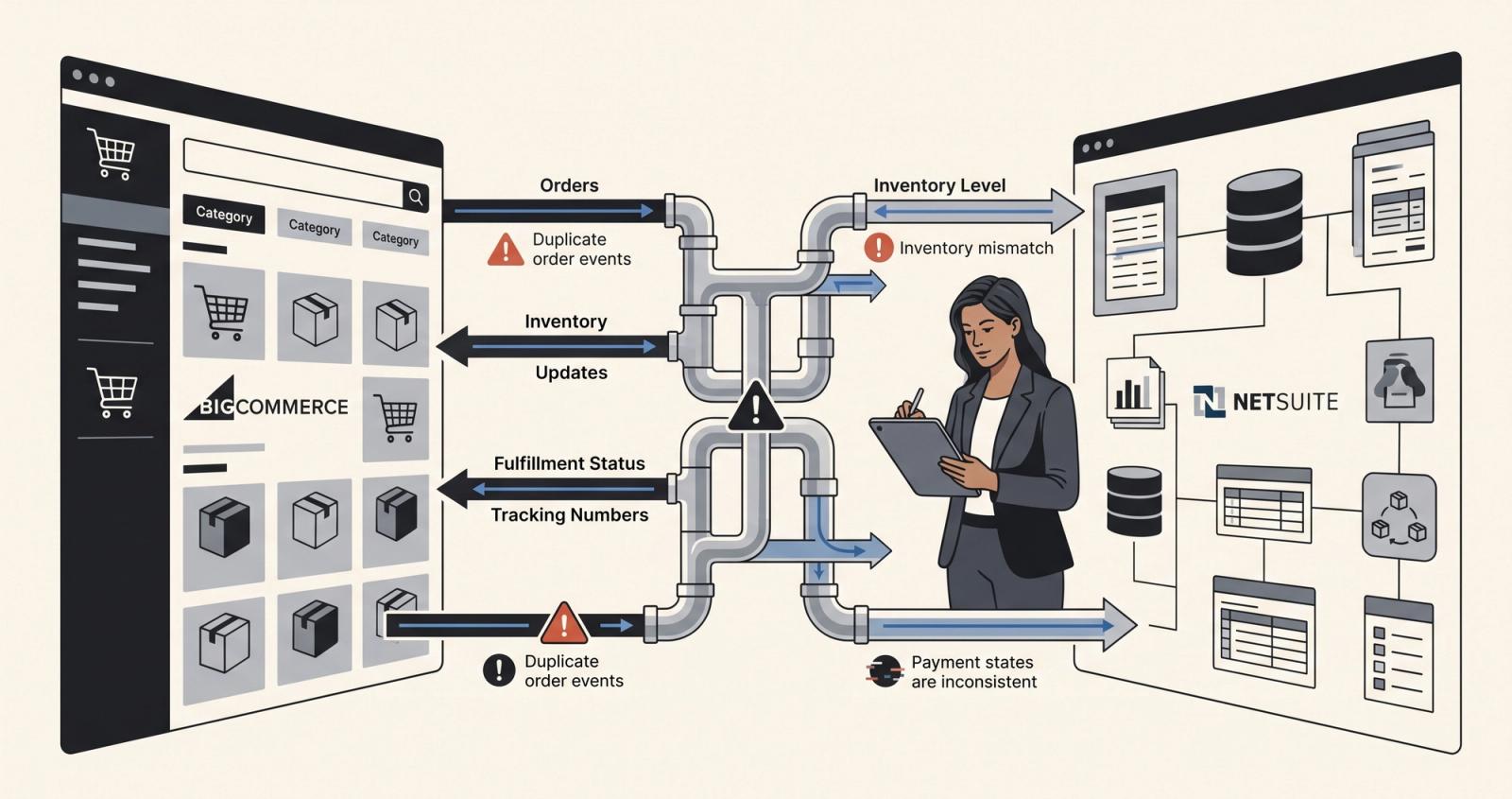
Most BigCommerce and NetSuite integrations look finished long before they are actually finished.
The happy path is easy to explain:
An order is created in BigCommerce.
It appears in NetSuite.
Someone fulfills it.
The shipment goes back to BigCommerce.
Done.
That is usually the part everybody understands in the first meeting.
The problems start when the business doesn't behave like the demo.
Which NetSuite location should reduce inventory?
What happens when an order is partially fulfilled?
Does an authorized payment mean the order is paid?
Which system owns customer pricing?
What happens if the same event is processed twice?
Who fixes the order when BigCommerce says one thing and NetSuite says another?
After working around ecommerce and ERP integrations for a while, I've stopped thinking of these projects as "connecting two APIs."
A good BigCommerce NetSuite integration is really about making sure an operational workflow stays correct across two systems that were built to care about different things.
And before I map a field, I usually want to know one thing:
When these systems disagree, which one is allowed to win?
The connector is not the workflow
This is probably the biggest misunderstanding I see around ecommerce integrations.
A business says:
We need BigCommerce connected to NetSuite.
But that doesn't tell me enough.
What they often actually need is something closer to:
BigCommerce order → NetSuite sales order → invoice → fulfillment → shipment status → payment reconciliation.
That's a workflow.
The connector is just one part of making that workflow happen.
If you focus only on moving data from A to B, it is possible to technically complete the integration while leaving the operations team with almost the same amount of manual work they had before.
For example, an order arriving in NetSuite doesn't automatically answer:
Who should invoice it?
When should fulfillment happen?
What should happen to the BigCommerce order status?
What happens if payment is still only authorized?
How are refunds handled?
What happens if part of the order is unavailable?
These are business rules disguised as integration requirements.
That's why our NetSuite integration work usually starts with the workflow rather than the connector.
BigCommerce NetSuite order sync is the easy part
Creating a NetSuite Sales Order from a BigCommerce order is relatively straightforward when everything is standard.
The difficult part is making sure the same order means the same thing in both systems.
Imagine BigCommerce sends:
- customer
- items
- quantities
- prices
- discounts
- shipping
- tax
- payment information
NetSuite might need those values represented differently depending on how the account has been configured.
Maybe discounts already exist in the BigCommerce line price.
Maybe shipping maps to a NetSuite shipping item.
Maybe the customer needs a particular subsidiary, price level or account number.
Maybe a B2B purchase order number has to survive the sync.
Maybe the order should remain pending approval instead of immediately entering fulfillment.
This is why I don't like requirements that simply say:
"Sync BigCommerce orders to NetSuite."
The first version of the integration may handle 95% of orders perfectly.
Production is where you discover what lives inside the other 5%.
And the other 5% is usually where people start manually repairing records.
For teams already dealing with those problems, our API integration work is less about adding another API and more about removing those manual exceptions.
"Sync the inventory" usually hides five more decisions
Inventory is another requirement that sounds simple until you ask what the number actually represents.
A business may have:
- multiple warehouses
- retail locations
- safety stock
- committed inventory
- backorders
- kits or assemblies
- stock that should never be sold online
So when someone asks me to implement BigCommerce NetSuite inventory sync, my next question is:
Which inventory should BigCommerce actually see?
If NetSuite says there are 100 units in total but 30 of them belong to a location that should not fulfill ecommerce orders, pushing 100 to the storefront may be technically accurate and operationally wrong.
Then there is timing.
If inventory updates every fifteen minutes, what happens when several orders arrive between syncs?
If inventory updates in real time, what happens during an API failure?
If someone manually adjusts inventory inside BigCommerce, is that allowed?
Which system is the source of truth?
These decisions matter more than the API endpoint.
This is also why multi-location inventory deserves proper design rather than being treated as an implementation detail.
B2B pricing makes ecommerce integration much more interesting
B2C ecommerce can often treat an order as an order.
B2B rarely stays that simple.
The same product may have different pricing depending on:
- the customer
- the company
- negotiated terms
- quantity
- catalog
- contract
- credit rules
Now the BigCommerce NetSuite integration needs to understand more than products and orders.
It may need to understand the customer's business relationship.
Who owns the customer account?
Where does customer-specific pricing come from?
Can the customer place an order if their credit limit is exceeded?
Does BigCommerce display prices from NetSuite, or maintain its own price lists?
What happens when those prices change?
How should company accounts and users map into NetSuite customer records?
This is where ecommerce becomes an ERP problem.
For ecommerce operations teams, the goal isn't simply having both systems contain the same data.
The goal is ensuring sales, fulfillment and finance are acting on the same version of reality.
Payment status is one of the easiest things to misunderstand
Payments deserve their own section because the words used by ecommerce platforms, gateways and ERPs can sound more interchangeable than they are.
Authorized is not necessarily captured.
Captured is not always the same thing as settled.
And "payment exists" does not automatically mean your NetSuite order should be treated as financially complete.
A real payment workflow may involve:
customer → BigCommerce → payment gateway → NetSuite → invoice/cash sale → capture/reconciliation.
Now imagine the customer successfully authorizes the card but your integration fails before NetSuite records the correct transaction reference.
Or NetSuite eventually needs to capture a payment that was originally authorized in BigCommerce.
Or the payment provider sends the same notification twice.
Those aren't UI problems.
They are state-management problems.
The safest implementations make the payment state explicit rather than assuming that a successful response somewhere in the chain means every other system should move forward.
Retries can fix an integration — or duplicate the problem
Eventually every integration fails.
An API times out.
A provider responds slowly.
A NetSuite script throws an error.
A network request disappears.
That's normal.
The dangerous part is what happens next.
A naive system says:
It failed. Try it again.
A production system has to ask:
Has this operation already completed?
That difference matters a lot.
If the failed operation is updating a product description, an accidental second update might not matter.
If it is creating an order, issuing a refund, recording a payment or updating a wallet, duplicate execution can become a financial problem.
That's why concepts like idempotency and external reference IDs become important.
Before repeating an operation, the integration should be able to determine whether that specific event or transaction has already been processed.
Retries are not just about reliability.
They are about making retries safe.
The most important architecture decision is usually ownership
Before implementing a NetSuite ecommerce integration, I like to create a simple ownership map.
Not which API endpoint does what.
Which system owns what.
For example:
NetSuite may own inventory.
BigCommerce may own the storefront experience.
NetSuite may own fulfillment.
The payment gateway owns the actual payment transaction.
Customer information might be shared, but one system still needs to be authoritative for specific fields.
Pricing might come from NetSuite for some customers and BigCommerce for others.
Orders may originate in BigCommerce but become operational records in NetSuite.
This sounds obvious.
It isn't always documented.
And when ownership isn't clear, teams eventually start making corrections in whichever system they happen to have open.
That's how synchronization problems become permanent.
For businesses already using NetSuite as an operational system, our NetSuite users work is usually about making the surrounding tools behave consistently with that operational reality.
Connector vs custom BigCommerce NetSuite integration
Another question I get is whether a business should use an existing connector or build something custom.
My answer is usually:
Use the standard solution when the standard solution actually matches your workflow.
There is no engineering prize for custom-building something that a mature connector already handles correctly.
If your requirements are mostly:
BigCommerce orders into NetSuite.
Inventory back to BigCommerce.
Fulfillment and tracking back to the storefront.
Standard customer/product synchronization.
A connector or integration platform may be exactly what you need.
The situation changes when the NetSuite environment has years of customization.
Maybe you have:
- unusual B2B pricing
- custom transaction forms
- several ecommerce stores
- specialized fulfillment logic
- custom NetSuite records
- non-standard payment flows
- complex location rules
- custom approval workflows
At that point the question is no longer:
Which connector is best?
It becomes:
How much of our actual workflow fits inside the connector without forcing the business to change around it?
Sometimes the right answer is configuring an existing integration.
Sometimes it's extending one.
Sometimes a custom integration is justified.
The architecture should follow the operational requirement, not the other way around.
One working workflow is often a better starting point than a massive integration project
ERP projects have a reputation for becoming long.
Sometimes that is unavoidable.
But I also think teams frequently make the first phase larger than it needs to be.
If the biggest operational pain is:
BigCommerce order → NetSuite sales order → invoice → fulfillment → storefront update,
then that can be treated as one workflow.
Define it.
Map the states.
Implement it.
Test failures.
Run it against realistic data.
Put it into production.
Then move to the next workflow.
That's a much safer promise than saying an entire ecommerce operation will be transformed in two weeks.
But a tightly scoped workflow can often move much faster than a traditional all-at-once ERP project.
That focused approach is similar to how we think about the AI Systems Sprint: define something meaningful enough to matter, but constrained enough that everybody can clearly agree what "working" means.
How I know an integration is actually finished
For me, an integration isn't finished because an order successfully synced during a screen share.
It is finished when the boring cases work too.
A duplicate event does not create another order.
A failed job can be retried.
Someone can see what failed.
Inventory comes from the correct locations.
Payments don't silently move into the wrong state.
Fulfillment returns to the storefront.
The operations team does not need an engineer every morning to repair yesterday's orders.
And when something eventually does fail, we have enough logging and context to understand what happened.
That is the difference between a demo and an operational system.
Final thought
The API usually isn't the hardest part of a BigCommerce and NetSuite integration.
Both platforms give us plenty of ways to move data.
The difficult part is deciding what that data means inside the business.
Which system owns inventory?
Which customer gets which price?
When is an order actually paid?
What should happen when fulfillment is partial?
What can safely be retried?
What happens when the systems disagree?
A good integration answers those questions before they become production incidents.
So when someone tells me:
"We just need BigCommerce connected to NetSuite."
I don't start with the connector anymore.
I start with the workflow.