 Aizaz
Aizaz

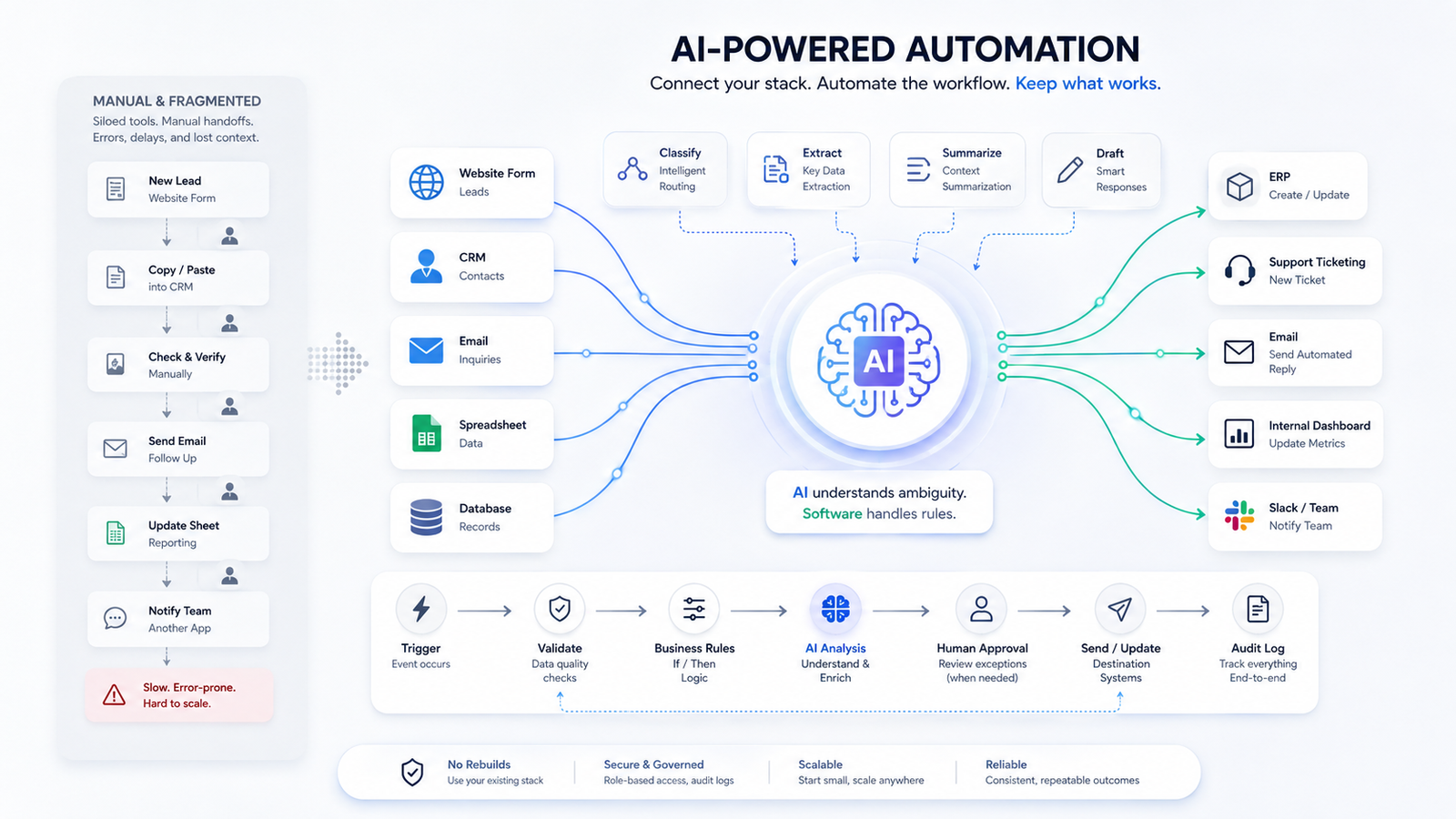
Most AI automation projects do not require replacing the existing stack.
In most cases, the better approach is to connect the systems already in use, automate the handoffs between them, and introduce AI only where it solves a specific problem.
Start With the Workflow
Before choosing a model or framework, map the existing process.
Identify:
- the trigger
- systems involved
- manual handoffs
- decision points
- failure cases
- system of record
This is the foundation of any reliable AI workflow automation project.
Keep Existing Systems Where Possible
A typical business workflow may already involve:
CRM → email → spreadsheets → ERP → support tools → internal applications
If those systems expose usable APIs or webhooks, replacing them usually creates more work than necessary.
The integration layer should handle the movement of data between them.
Where AI Should Be Used
AI is useful when the workflow contains tasks that are difficult to express with deterministic rules.
Typical examples include:
Classification
Classifying leads, requests, documents, tickets, or messages.
Data Extraction
Converting unstructured text, PDFs, emails, or forms into structured data.
Summarization
Reducing long documents or conversations into concise operational context.
Drafting
Generating initial responses, reports, or internal notes.
Decision Support
Ranking or recommending actions where simple business rules are insufficient.
If normal code can handle the task reliably, use normal code.
Typical Architecture
A practical business workflow automation system often looks like this:
Trigger → API or webhook → validation → workflow logic → AI step if required → CRM / ERP / database → notification or approval → monitoring
The AI model is only one component.
Most production problems occur around integrations, data validation, retries, and system ownership.
Example: Lead Qualification
A basic AI lead qualification workflow could be:
Form submission → validate input → enrich company data → classify lead → create or update CRM record → draft response → route uncertain cases for review
The goal is not to remove every human step.
The goal is to remove repetitive work while keeping exceptions visible.
Design for Failure
Production automation must assume that something will eventually fail.
Plan for:
- duplicate webhook events
- invalid AI responses
- unavailable APIs
- missing data
- rejected CRM or ERP records
- partial workflow completion
Use validation, idempotency, retries, logging, and alerts.
A workflow that only works in the happy path is not production-ready.
Keep Human Approval Where Required
Some actions should remain reviewable.
Examples include:
- payments
- contracts
- compliance-sensitive decisions
- customer-facing communication
- destructive or irreversible actions
Good AI business process automation reduces unnecessary manual work without removing control where mistakes are expensive.
Start Small
The best first automation is usually one clearly defined workflow.
Examples:
- lead qualification
- document processing
- support triage
- invoice processing
- CRM enrichment
- internal reporting
Build one workflow, measure the result, then expand.
What to Measure
Track operational outcomes such as:
- manual steps removed
- processing time
- error rate
- response time
- number of automated transactions
- exception rate
If the workflow does not improve a measurable operational outcome, adding AI has not created much value.
When a Rebuild Makes Sense
A rebuild may be justified when the current system:
- has no usable integration surface
- cannot support the required workflow
- creates security or reliability problems
- is significantly more expensive to maintain than replace
Otherwise, integration is usually the faster starting point.
Final Thought
The most effective AI automation systems are often simple:
receive data → validate it → apply logic → use AI where useful → update the correct system → handle exceptions.
The engineering challenge is not adding AI.
It is making the complete workflow reliable.